A field guide to the CrazyGames build
Running a checkout
A checkout is the whole game at LVL 1: customers queue, put items on the belt, and you get paid. This page is the sequence we recorded on 2026-11-06, screen by screen, including the parts the client does by itself.
The till is a counter, not a menu
New Store drops you straight behind a counter. Three customers stand in front
of it, items sit on the belt, and the monitor in the middle of the screen reads
Total $0.00. The top bar carries what the rest of the site already documents:
SKIP TUTORIAL, LVL 1, a money counter at 10.00 and the objective
Complete 3 Checkouts 0/3.
Nothing here is a text menu. Every step is a click on an object in the room.
Ring up one item at a time
Clicking an item on the belt rings it up. The monitor then prints two things: the item's own name and price on one line, and the running total under it. The frames we kept show the same screen twice:
| Clicked | Monitor shows | Total |
|---|---|---|
| the yellow bag | Classic Chips $0.55 | $0.55 |
| the bottle | Water $0.50 | $3.20 |
The total is the tell that each click is a sale line rather than a pick-up. The line above the total changes with the item; the total only ever grows.
The card reader appears when the belt is empty
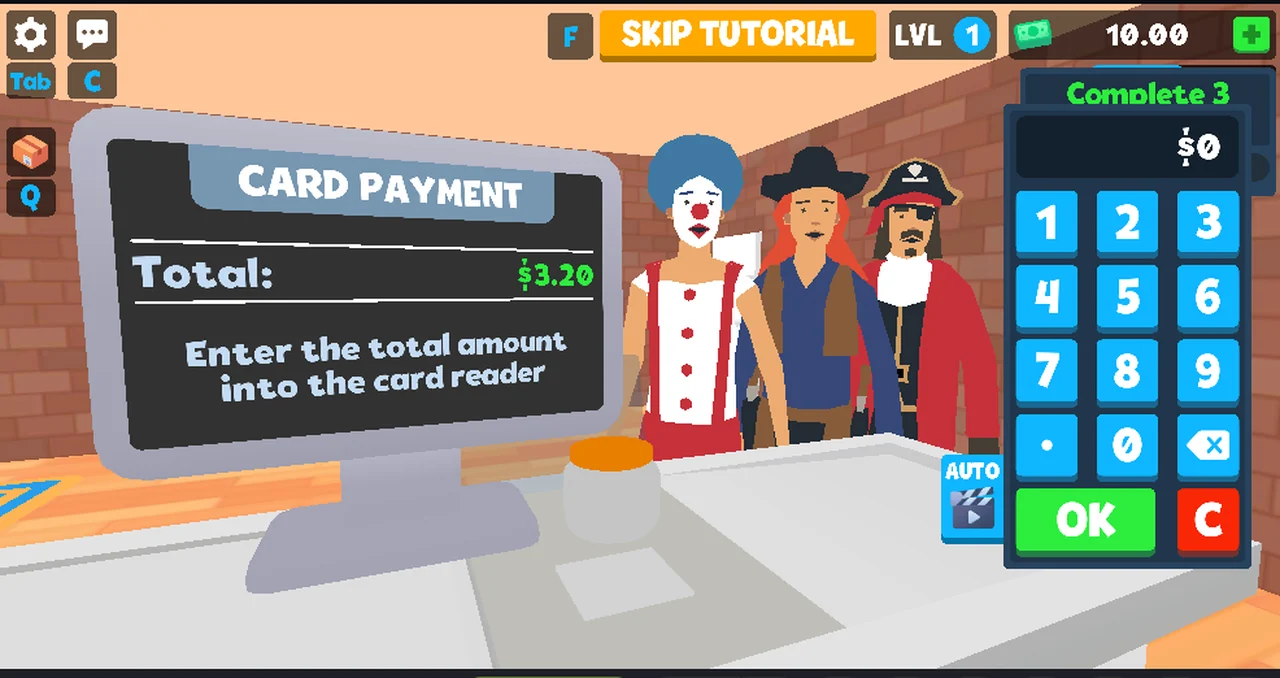
Once the last item has been rung, a card reader shows up on the counter next to the monitor. It was not on the counter before the last click, which makes it the client's own signal that the basket is finished.
Clicking it opens the payment panel.
CARD PAYMENT
The panel carries its own name and instruction:
| Field | What it printed |
|---|---|
| Title | CARD PAYMENT |
| Amount | Total: $3.20 |
| Instruction | Enter the total amount into the card reader |
| Keys | 1–9, 0, ., backspace |
| Buttons | AUTO, OK, C |
Typing the amount by eye is where we failed: the keypad is drawn on the canvas
and has no DOM elements, so two attempts produced $1720 and $3728 instead of
$3.20. The C button did not clear what we had typed in either attempt. That
is a fact about our clicking, not necessarily about the game — a player with a
mouse and the keypad in front of them can type it correctly.
What AUTO did
AUTO is not a display setting. Pressing it once, with nothing typed, filled the
amount and completed the sale without any further click:
- the screen went black for about ten seconds (an interstitial from the portal, not the game),
- the sale closed,
- the money counter went from
10.00to13.20, - the objective counter went from
0/3to1/3, - a new customer walked up with a new basket.
The difference in money is exactly the total of the sale, so AUTO charged the
right amount rather than a rounded one.
The other payment mode
An earlier session on the same build showed the cash side of the same checkout:
a CASH PAYMENT panel with the lines Received:, Total:, Change: and
Given:, and a GIVE CHANGE panel beside it holding $1, $5, $10, $20,
$50 notes and 1c, 5c, 10c, 20c, 50c coins, with AUTO, a reset arrow,
OK and C underneath.
That panel is on the site as plate 2 of the glossary. What we have not seen is what decides whether a customer pays by card or in cash — the two sessions used different builds of the same game a day apart.
What the shift panel printed
Clicking the counter after the sale opened SHIFT RESULTS:
| Line | Value |
|---|---|
CUSTOMERS SERVED | 1 |
ITEMS SOLD | 6 |
TOTAL REVENUE | $3.20 |
TOTAL EXPENSES | $0.00 |
PROFIT | +$3.20 |
A second shift panel, after two sales, printed the same five lines with larger
numbers: CUSTOMERS SERVED 2, ITEMS SOLD 11, TOTAL REVENUE $5.80,
TOTAL EXPENSES $0.00, PROFIT +$5.80.
Revenue and profit matched the till both times, and the money counter moved by
exactly that amount. ITEMS SOLD is the line we cannot account for: it printed
6 against the four items we watched being rung up, and 11 after a session where
we never saw more than six items on the belt. We record the mismatch instead of
explaining it. Either the counter counts something else, or our own clicking
counted items we did not see.
Not tested
- typing a wrong amount on purpose and seeing what
OKdoes with it - whether the keypad accepts the keyboard as well as the mouse
- whether the cash panel appears in this build at all
- what happens after the third checkout, when the objective is complete
Last checked against the client: 2026-11-06 · client web build 2026-11-06 · portal last updated October 2026