A field guide to the CrazyGames build
The client's own words
This build ships no manual, so its vocabulary has to be collected from the screen. Everything below is a string this guide quotes from the client on 2026-11-06, in the order a new player meets it.
Before a store exists
| Term | Where it is printed | What the build says |
|---|---|---|
| New Store | main menu | one of three doors; the one that opened the configuration dialog in our session |
| Load Store | main menu | opens a store already saved in this browser |
| Join Store | main menu | enters another player's store; not opened in our session |
| FOLLOW US | main menu, bottom left | a button with an Instagram glyph; where it leads was not opened |
| STORE CODE | store panel | a code with a COPY button — 4966B in our session |
| STORE LINK | store panel | a URL with its own COPY button |
The configuration dialog
| Term | What the build says |
|---|---|
| VISIBILITY | the panel title |
| Private | one of the two options |
| Public | preselected when the panel opened, with the line "Public store. All players are welcome to join." |
| PLAYER PERMISSIONS | the second block in the same panel |
| Visitor | the lowest of the three settings |
| Assistant | the middle setting, preselected when the panel opened |
| Manager | the highest setting |
| SAVE & CONTINUE | the button that closes the panel and starts loading |
The middle setting explains itself: "Normal permissions. Joining players can help you in the store but can't buy, sell, or change prices."
On the floor
| Term | Where it is printed | Notes |
|---|---|---|
| LVL | top right | LVL 1 on a fresh store |
| SHIFT | top right | a panel we have not seen filled yet |
| OPEN | beside the door | a sign that hangs there when the store is trading |
| Q | left edge | a key hint we have not followed |
| Tab and C | top left | printed under the gear and chat icons |
At the till
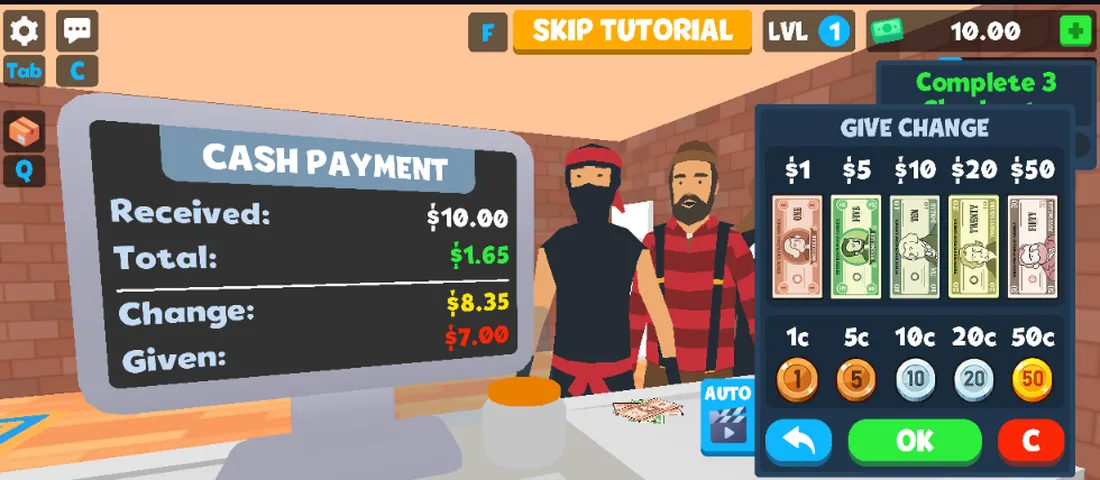
The checkout screen switches the monitor from a total to a labelled panel, and the drawer beside it prints ten denominations.
| Term | Where it is printed | Notes |
|---|---|---|
| CASH PAYMENT | monitor header | replaces the idle total while a customer is paying |
| GIVE CHANGE | drawer header | the panel you build the change in |
| AUTO | drawer, left | one button that fills the change for you |
| OK | drawer, green | confirms the amount given |
| C | drawer, red | clears the amount given |
| SKIP TUTORIAL | top centre | only while the tutorial is running |
One string on screen is not the game's: the CONTINUE overlay is printed by the portal around the canvas, so it is left out of these tables.
Joke alerts
The main menu prints one of these in the middle of the screen on load. Across four loads we saw four, and they are flavour text rather than error messages:
- "Alert: customer launched into orbit by trolley physics."
- "Warning: store layout now officially cursed."
- "Reminder: checkouts don't accept hugs as payment."
- "System Error: cash register jammed with memes."
Terms we have not seen yet
Employee, shoplifter, shipment and day-end are all words this genre usually prints, and we have not caught this build saying any of them. They are absent here on purpose: a glossary that fills the gaps with guesses is worse than a short one.
Last checked against the client: 2026-11-06 · client web build 2026-11-06