A field guide to the CrazyGames build
What the till prints, and what it does not
The client has no price list. Each time you scan an item the monitor overwrites the previous line with the new item's name and price, plus a running total, so prices have to be caught one click at a time. This page is everything we caught.
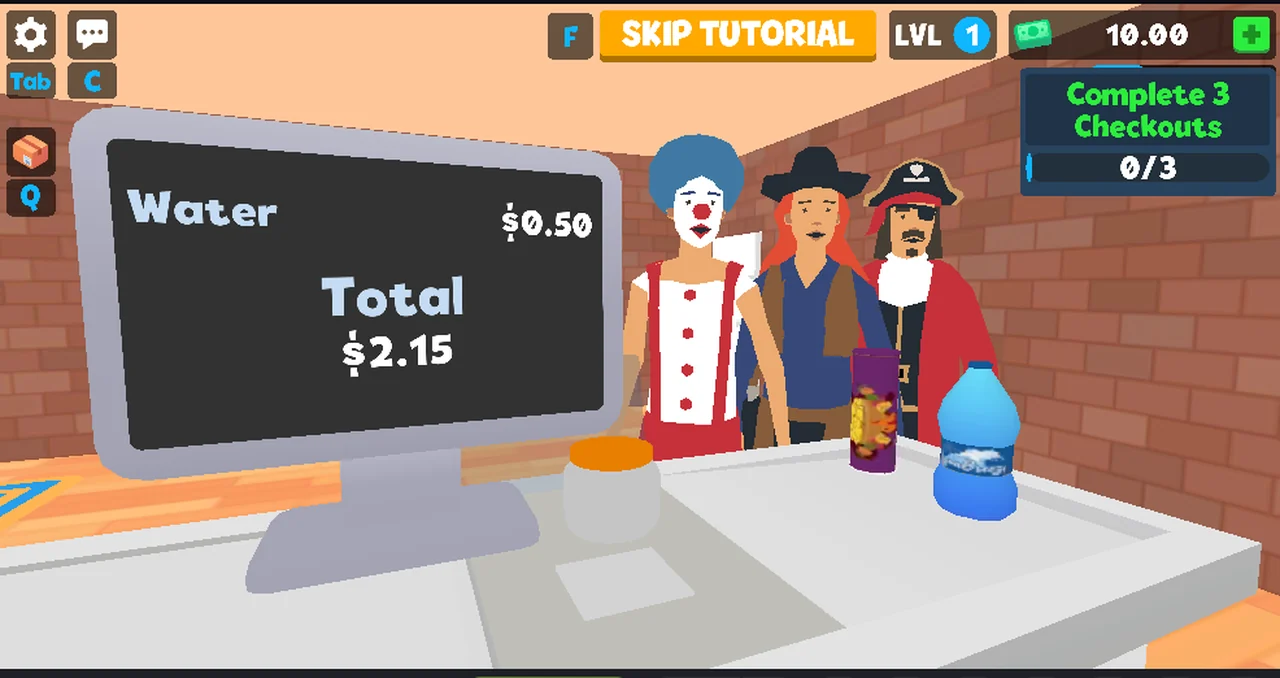
What the monitor shows when you scan
Two lines, and only two: the item you just scanned with its unit price, and a
running Total that accumulates across the basket. Scan another item and the
first line is replaced.
| Reading | Item line | Total after |
|---|---|---|
| 1 | Classic Chips $0.55 | $0.55 |
| 2 | Water $0.50 | $2.15 |
| 3 | Water $0.50 | $3.20 |
The totals are exact, and they carry into the payment panel: the CARD PAYMENT
screen asked for $3.20 for the basket that ended at $3.20. After AUTO the
money counter rose from 10.00 to 13.20, exactly the total.
Why there is no price list here
We could not build one. The monitor shows one item at a time, so a full catalogue would need a screenshot per item, and the belt only presents what the next customer happens to bring. In our sessions that was chips, bottles and purple snack bags; we never got a named price for the bags because the line was overwritten before we read it.
Two of the readings above name the same item (Water) with the same price, which
is the only repeat we have. It is weak evidence that prices are fixed rather than
randomised, and we say weak on purpose.
What the receipt panel adds
SHIFT RESULTS gives TOTAL REVENUE for a whole shift but no itemisation: in one
session $3.20 from 4 scanned items, in another $5.80 from 11 items sold. There
is no per-item breakdown anywhere in the client that we found, which is why this
page is short.
Not tested
- prices for the purple bags, or any item we never caught on the monitor
- whether prices change with
LVLor with the customer - whether a discount, a coupon or a spoiled item can appear at all
- whether
AUTOwould accept a wrong amount (we only used it with the right one)
Last checked against the client: 2026-11-06 · client web build 2026-11-06 · portal last updated December 2025