A field guide to the CrazyGames build
Five controls, one panel
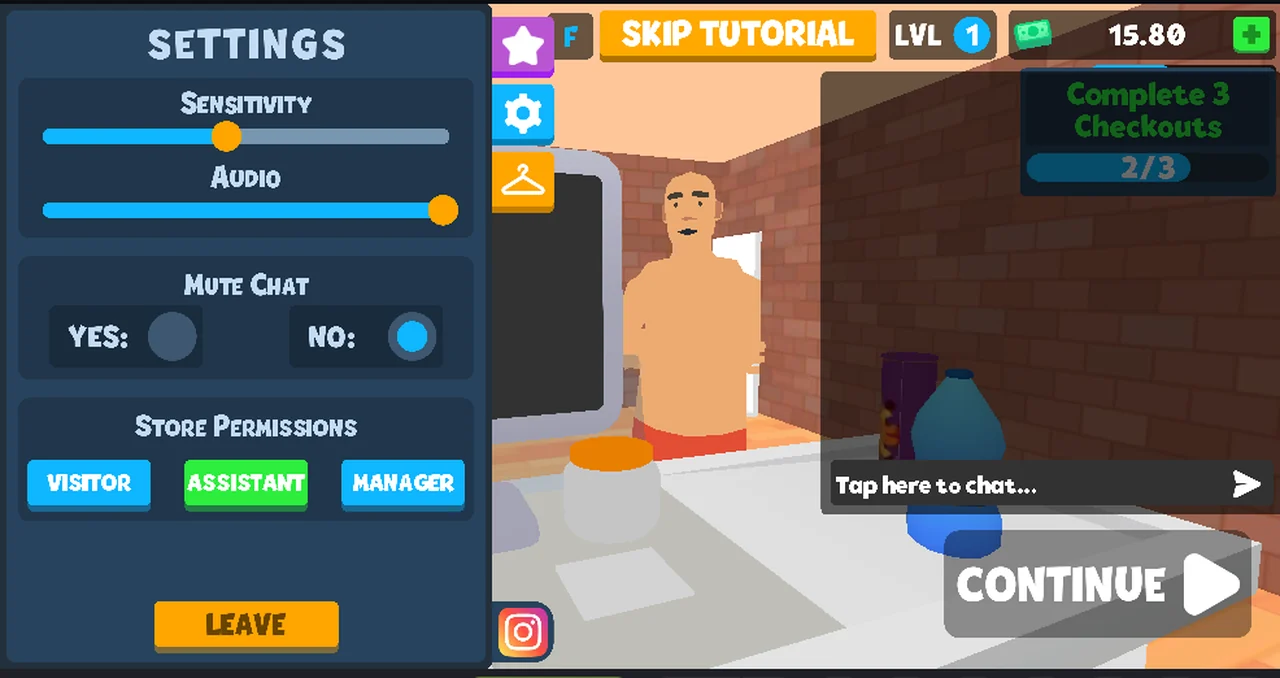
The gear in the corner of the HUD opens a store panel, and the gear inside that panel opens SETTINGS. This page lists what is on it, what each control said it was, and which ones we never touched.
How to get here
Two clicks. The gear at the top-left of the game screen opens the store panel;
the gear tab in that panel's right-hand rail switches the panel to SETTINGS.
The other two tabs in the same rail are a star and a coat hanger.
The panel's own last button is LEAVE. The translucent CONTINUE arrow at the
right edge is the portal overlay described on the glossary page.
What is on the panel
| Control | Label as printed | State when it opened |
|---|---|---|
| Slider | SENSITIVITY | knob about a third along the bar |
| Slider | AUDIO | knob close to the right end |
| Switch | MUTE CHAT: YES / NO | NO filled |
| Buttons | STORE PERMISSIONS: VISITOR / ASSISTANT / MANAGER | ASSISTANT filled green |
| Button | LEAVE | orange, at the bottom |
That is the whole panel. There are no tabs inside it, no scroll, no advanced section behind a disclosure triangle.
What we did not touch
We opened the panel, read it, and closed it. We did not drag either slider, so
we cannot tell you what SENSITIVITY governs — mouse look and camera turn are
both plausible and neither is observed. We did not press YES on MUTE CHAT,
did not change which permission button was filled, and did not press LEAVE:
that last one is the button that ends your session in the store, and we wanted to
keep the session.
So the only thing this page can state as fact is the vocabulary and the opening state. Everything about effect is untested.
The permission row is the interesting one
VISITOR, ASSISTANT and MANAGER are also the three words the store panel uses
for what a joining player is allowed to do — see the store panel page for that
row and for the LEADER value it printed for us. Here they appear as a control,
one of them filled, which suggests the host sets a default for whoever joins.
We did not press them, so we do not know whether pressing one changes your own permissions, the default for new players, or both.
Not tested
- what
SENSITIVITYchanges - what
AUDIOchanges, and whether it covers music, effects or both - whether
MUTE CHATsurvives a reload - whether the permission buttons change anything at all in a single-player store
- what
LEAVEreturns you to
Last checked against the client: 2026-11-06 · client web build 2026-11-06 · portal last updated December 2025