A field guide to the CrazyGames build
Five lines, one mismatch
After a sale, clicking the counter instead of an item opens SHIFT RESULTS: five labelled numbers and a CONTINUE button. We have two readings of it. Three of the five numbers reconcile with the till; one clearly does not, and one we could not check.
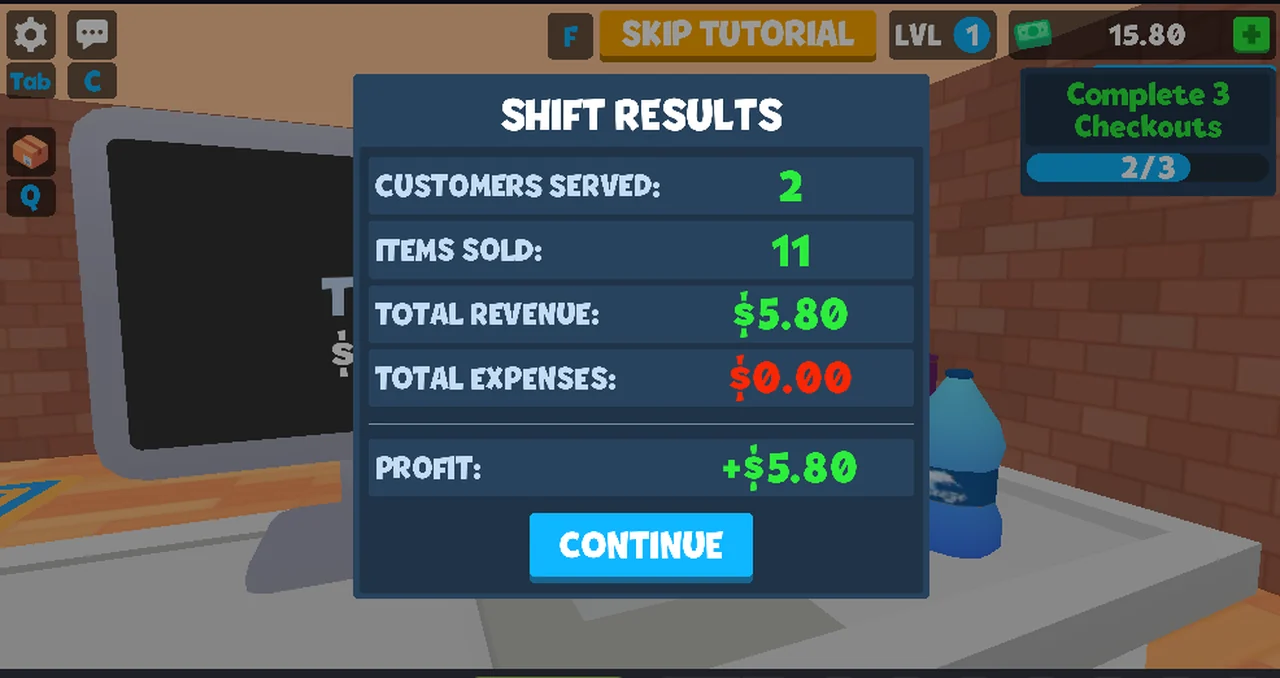
How it opens
Clicking an item on the belt rings it up. Clicking the counter itself — the flat
surface, not the goods — opens SHIFT RESULTS instead, with whatever has been
sold so far. We opened it twice, both times in the middle of a shift that was
still going.
CONTINUE closes the panel and play carries on with everything unchanged: the
same customer, the same belt, the same objective counter.
The two readings
| Line | After one sale | After two |
|---|---|---|
CUSTOMERS SERVED | 1 | 2 |
ITEMS SOLD | 6 | 11 |
TOTAL REVENUE | $3.20 | $5.80 |
TOTAL EXPENSES | $0.00 | $0.00 |
PROFIT | +$3.20 | +$5.80 |
Three of these reconcile with the till
The first sale was one basket whose running total ended at $3.20, and the money
counter went from 10.00 to 13.20. The panel printed revenue $3.20 and
profit +$3.20. The second reading came when the counter stood at 15.80, which
is 10.00 + $5.80, and the panel printed revenue $5.80 and profit +$5.80.
Profit equals revenue minus expenses in both readings, and expenses was $0.00
both times — nothing we did bought anything, so there was nothing to spend on.
ITEMS SOLD is the line that does not reconcile
Our first basket had four items on the belt and we clicked each one; the panel
printed 6. The second reading came from a session where we never saw more than
six items on the belt at once, and across the two sales we had rung far fewer
than eleven.
We are not going to explain this. Either the counter counts units we did not see — a basket can hold more than the belt shows, which is a guess — or our clicking rang items twice without the monitor showing it. Both are speculation, so the site records the mismatch and leaves it.
What is not on the panel
No time, no shift number, no per-item list, no customer names, no way to reopen a
previous shift. The five lines are the whole report, and CONTINUE is the only
control.
Not tested
- whether a shift ever ends on its own, or only when you click the counter
- what a shift with non-zero
TOTAL EXPENSESlooks like - whether
ITEMS SOLDis ever equal to the number of clicks we make - what
CONTINUEdoes if the till is mid-transaction
Last checked against the client: 2026-11-06 · client web build 2026-11-06 · portal last updated December 2025