A field guide to the CrazyGames build
What each corner of the screen is
The till screen carries twelve or so separate elements, and two of them are not the game at all. This page names each one, says what it printed while we played, and marks the ones we never pressed.
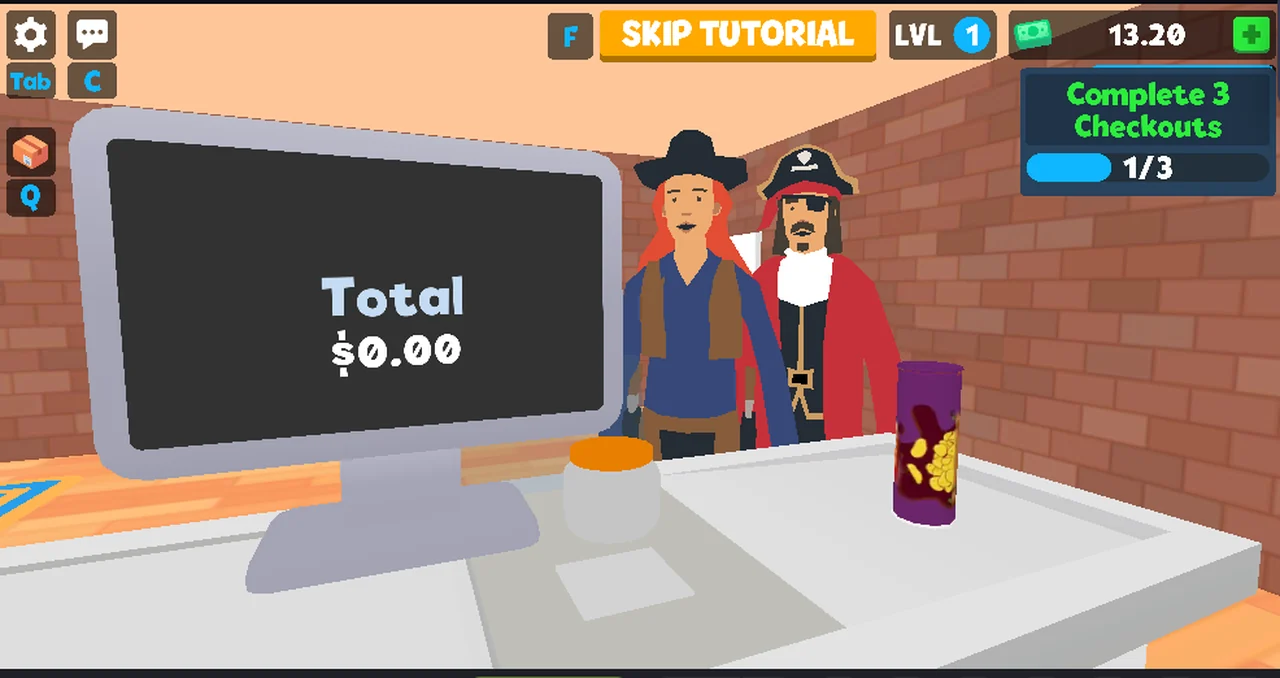
The top bar
| Element | What it printed | Notes |
|---|---|---|
| key badge | F | printed to the left of the next item |
| pill | SKIP TUTORIAL | gold; never pressed |
| level | LVL + 1 | blue badge, did not change in our sessions |
| money | 10.00 → 13.20 → 15.80 | flanked by two green banknote tiles |
| objective | Complete 3 Checkouts + bar + 0/3 → 1/3 → 2/3 | the only progress display we saw |
The money counter is the one number we can cross-check: it moved by exactly the
TOTAL REVENUE that SHIFT RESULTS printed after each sale.
The left column
From the top: a gear, a speech bubble, then the badges Tab and C, then a
cardboard box icon, then a badge Q.
Two of these are confirmed by use: the gear opens the store panel, and the box or
Q opens DELIVERIES. Tab and C are key hints with no visible effect in our
sessions — we pressed both and nothing appeared.
What is not the game
Under the canvas sits a strip that the portal draws, not the game: Invite friends, a like count at 16K, a thumbs-down, a bookmark, a red round button, a
chat icon, a keyboard icon, a phone icon, a speaker and a fullscreen arrow.
Nothing on that strip is part of the client, and this site does not describe it as
gameplay. The same goes for the Tap here to chat... prompt that hangs over the
scene, and for the portal's interstitial that sometimes covers the canvas.
Reading it in order
For a player the useful order is: objective card first (it says what to do next), money second (it confirms a sale went through), the left column third (it is where the panels are). Everything else is decoration or the portal.
Not tested
- what
SKIP TUTORIALdoes, and whether a tutorial exists at all - what
TabandCare for - what the two banknote tiles around the money counter mean
- whether
LVLever rises, and what raises it - what the red round button in the portal strip does
Last checked against the client: 2026-11-06 · client web build 2026-11-06 · portal last updated December 2025